Angelo on Earth

Founding Beta in preparation · Not on sale yet · Non-binding sign-up

For creators who make reels, TikToks and shorts on a regular basis

You recorded that line three times over.
And now you're back in the edit.

AngelOnEarth Content Studio cuts your raw clips automatically, throws out the failed takes, adds the subtitles, and checks before you publish whether there's a sentence in there you'd rather not have said.

All the heavy lifting happens on your own machine. Your raw footage goes nowhere.

No subscription lock-in, there's a one-time version too. Today this is only about a non-binding sign-up.

The problem

The problem isn't the idea. The problem is everything after it.

You know what you want to say. You hit record. And then:

  • You stumble, so you say the line again. And again. In the end there are four attempts in one file, and later you have to listen to all of them to find the good one.
  • You cut. You add subtitles. You build a cover. You hunt for a quote for the quote card. For a video under a minute long.
  • And at some point the question arrives: did I just say something that's going to come back at me?

That last one is the worst. Not because it happens often, but because once is enough. Most tools solve only the first part, and to do it they upload all of your raw footage somewhere: every attempt, every slip, everything you never meant to publish. That's exactly the point where I work differently.

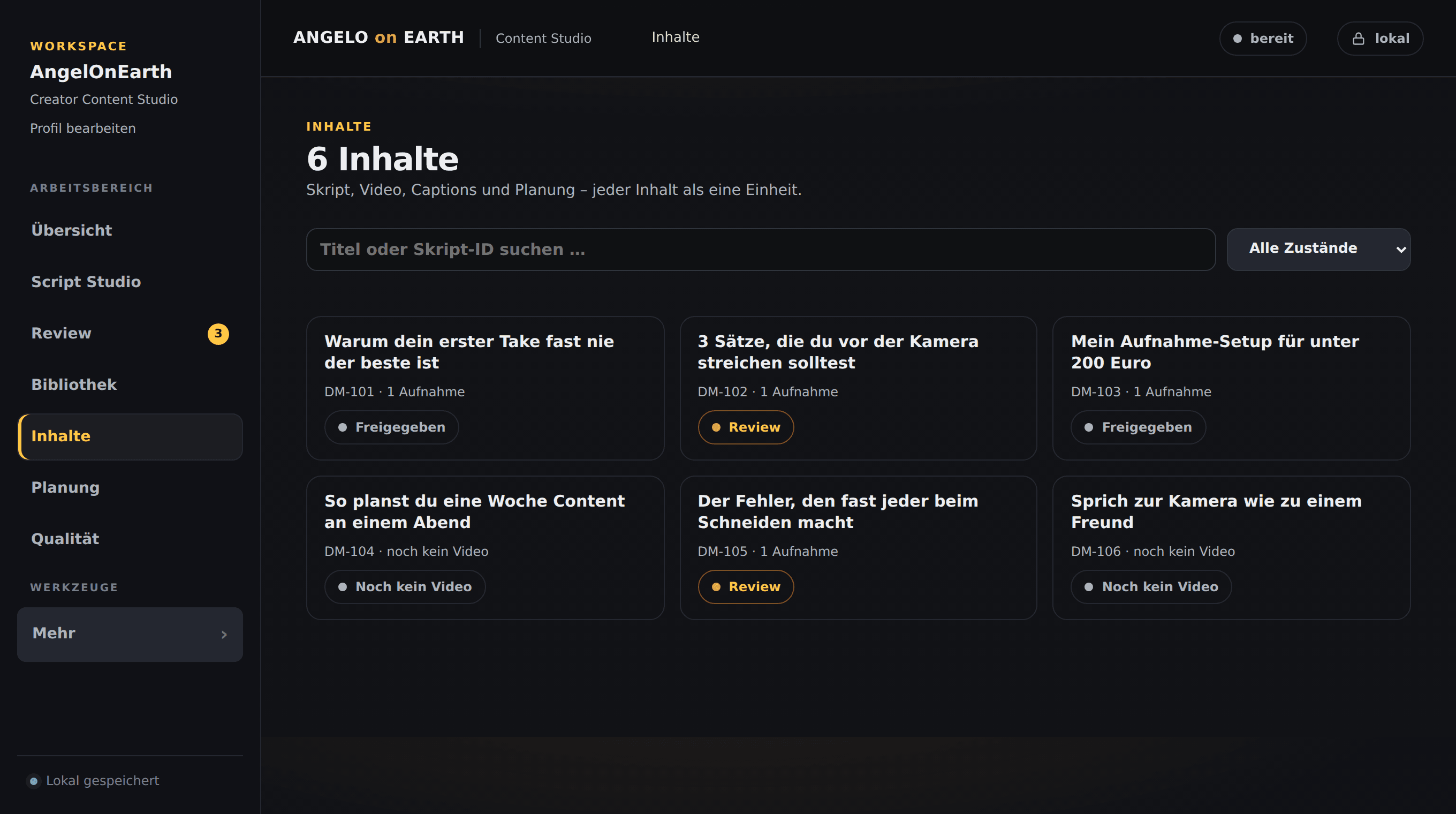
Screen view from Content Studio: the "Inhalte" (contents) list with six video cards, each with a title, script ID, number of recordings and a status such as "Freigegeben" (cleared), "Review" or "Noch kein Video" (no video yet). On the left the navigation with overview, Script Studio, Review, library, contents, scheduling and quality; top right the indicators "bereit" (ready) and "lokal" (local); bottom left the note "Lokal gespeichert" (saved locally).
A real view of Content Studio – demo workspace
The workflow

One workflow, four steps, your machine.

  1. 01

    Raw clips in

    You drop your recordings into a folder. Several attempts in the same clip are no problem, that's exactly what the retake detection is for.

  2. 02

    Cut and subtitles run automatically

    Failed takes out, the last good one stays. Subtitles are generated locally with Whisper. Cover and quote card come with it.

  3. 03

    Safeline checks before anything leaves

    The filter looks for sensitive terms and patterns. If it finds something, the video is held back and shown to you. You decide.

  4. 04

    Scheduling as a CSV

    At the end you get a Metricool CSV with your videos and dates. You import it, Metricool posts. I don't post directly for you.

The sentence that matters

Your raw footage does not leave your machine. Not the failed takes, not the slips, not the one where you swore halfway through. None of it sits on someone else's server. That isn't a setting you can forget to switch on, it's how this is built.

What the tool does

Four parts that work together

Editing

The edit that knows your failed takes

Content Studio spots repeated attempts inside the same clip. It keeps the last good one and drops the ones before it. You no longer have to listen through every take to find out which one was usable.

  • Subtitles via Whisper, generated locally, no cloud transcription
  • Cover image for the thumbnail
  • Quote card built from a line of your own transcript

No substitute for your taste: if you want to keep a pause because it lands, you keep it. The tool does the dull work, not the decisions.

Safeline

Safeline, the filter before you publish

A local compliance and brand-protection filter. It runs before a video is cleared and searches your transcript for passages that could cause you trouble later. If it finds something, the video is held back. You see the spot and decide: recut, re-record, or clear it deliberately.

  • References to your employer, industry, internals, colleagues
  • Specific amounts of money and figures you don't want in public
  • Quitting and exit topics, plus anything else you define as sensitive

Honest and important: Safeline is a tool, not legal advice. It finds the patterns you define, it doesn't know your employment contract, and it can't guarantee it finds everything. What you publish is on you. When it gets serious, ask someone qualified.

Script Studio

Script Studio, from idea to sign-off

The part that happens before the camera. You record your topic, your tone and your limits once, and that becomes the basis for everything after.

  • Collect ideas and series instead of losing them in notes
  • Script blueprints as scaffolding: hook, body, close
  • Versions and a sign-off workflow, every draft is kept

Honestly: a script scaffold doesn't replace having something to say. It just means you're not staring at a blank page for every video.

Scheduling

Scheduling through a Metricool CSV

Once a video is finished and cleared, it lands in a scheduling CSV in Metricool format. You import it, your dates live there, Metricool publishes.

  • No direct posting, that would need standing access to your accounts
  • The detour through the CSV costs you one click
  • No Metricool? The CSV is an ordinary table, you can also just read it as a plan

This isn't a feature that's still coming. It's built this way, and the reason is right next to it.

See the offers

The offers

Two ways. Both described honestly.

There are two ways to use this. The production core is the same. What differs is access, synchronisation and operation — and how you pay. Read both before you decide, and if something is still unclear afterwards, write to me rather than guess.

The two ways side by side

The fast look. The detailed cards with every field sit right below.

The two ways side by side
FeatureHybrid Founding PlanLocal / Privacy Edition
Price€19 per month, cancel monthly€149 one-time
Where it runsVideo work locally on your machine, account and scripts on the webEverything locally on one machine, no server
Videos stay local?Yes, alwaysYes, always
Browser accessplanned for launchYes, for account, ideas, scripts and schedulingNo
Devicesplanned for launchSeveral through the browser; the video work stays on the machine with the workerOne machine
Payment todayNone. A non-binding sign-up only.None. A non-binding sign-up only.

"Planned for launch" means: these points belong to the hybrid setup and will be there with the Founding Beta, not today. The local production core — editing and retake detection, subtitles, Safeline, Script Studio and the scheduling CSV — already runs.

Hybrid Founding Plan

€19per month, cancel monthly

Account, ideas, scripts and scheduling in the browser. The video work runs through a local worker on your machine.

Account, ideas, scripts, scheduling
Runs on the web, in your browserplanned for launch
Editing, retakes, subtitles, Safeline
Local, on your machine (via the worker)planned for launch
Your raw videos
Never leave your machine
Your own API keys
Stay local with the workerplanned for launch
What sits on my server
Account data, ideas, script texts, scheduling data, job statusplanned for launch
Multiple devices
Yes, through the browser; the video work stays on the machine with the workerplanned for launch
Extra installation
Yes, the local workerplanned for launch
Operating system
Windows
Stopping
Cancel monthly, after that no more web access; your local files stay yours

A fit if: you work in several places, want to capture ideas and scripts on your phone as well, and can live better with a monthly amount than with a larger one at once.

Probably not a fit if: you don't want anything on someone else's server on principle, script texts included.

Sign up for Hybrid (non-binding)

Local / Privacy Edition

€149one-time

One program on one machine. There is no server that could hold anything of yours.

Account, ideas, scripts, scheduling
Runs locally on your machine
Editing, retakes, subtitles, Safeline
Local, on your machine
Your raw videos
Never leave your machine
Your own API keys
Stay local
What sits on my server
Nothing. There is no server.
Multiple devices
No, tied to the one machine
Extra installation
Yes, the program itself
Operating system
Windows
Stopping
Nothing to cancel. It keeps running.

A fit if: you don't want the cloud, do everything on one machine and would rather pay once.

Probably not a fit if: you switch between machines regularly or want to work on ideas while you're out.

Sign up for Local (non-binding)

On the price: both prices are founder prices in an early phase. You get it cheaper than later, and in return you get a product that still has rough edges. If you're looking for something finished and polished, you're too early.

On the hybrid plan: it's called hybrid because it really is. Part runs on the web, part on your machine. That's more awkward than pure web, and the reason is exactly the one you read above.

True in both cases: no direct posting, scheduling runs through the Metricool CSV.

And true today: there is no checkout yet. You put your name down without obligation, you pay nothing and you order nothing.

What stays on your machine

  • Your raw videos, every attempt and every slip
  • The edit and the retake detection
  • The subtitles, generated locally with Whisper
  • The Safeline check, including the passages it finds
  • Your own API keys for the AI features

On the hybrid plan my server only holds account data, your ideas and script texts, your scheduling and the status of your jobs. No video, no audio, no raw cut. With the Local Edition there is no server at all.

Sign-up

Put your name down, no obligation

This is not a purchase. There is no checkout, you enter no payment details, and no payment obligation arises.

You just tell me which way fits you. As soon as the founding checkout opens, I'll get in touch by email. Your sign-up only becomes an order once you pay there — until then one line to me is enough and I'll take you off the list.

Required, this is where I get back to you.

Which way are you signing up for?

No purchase, no payment obligation: you enter no payment details and you order nothing.

Privacy

I store your email, your name (if given), your chosen way, the timestamp, your language version and a shortened browser identifier (spam protection). No payment details.

FAQ

Questions you're right to ask

What exactly does »non-binding sign-up« mean?

No. There is no checkout here, you enter no payment details and no payment obligation arises. You only tell me which way fits you. As soon as the founding checkout opens I'll get in touch by email; only when you pay there does the sign-up become an order. Until then one line to me is enough and I'll take you off the list.

Can I use Content Studio today?

Not yet. The Founding Beta is in preparation. The local core runs: editing with retake detection, Whisper subtitles, the Safeline check, Script Studio and the scheduling CSV. The hybrid setup — browser access, synchronisation across several devices and the connection to the local worker — is planned for launch. That's why there's a sign-up here and not a buy button.

What happens to my videos?

They stay on your machine. Editing, retake detection, subtitles and the Safeline check all run locally. I don't upload your raw footage, not even "for processing", not even temporarily. On the hybrid plan my server only holds account data, your ideas and script texts, your scheduling and the status of your jobs. No video, no audio, no raw cut.

What is the local worker?

A small program you install once on the machine where your videos live. It picks up jobs from your account, works through them locally and reports back only the status: done, error, Safeline found something. The files themselves stay where they are. You start the worker when you work, it doesn't have to run around the clock. The worker belongs to the hybrid setup and is planned for launch. With the Local Edition you don't need a worker, there everything is one program.

Do I need my own API keys?

For the AI features in Script Studio, yes, you supply your own key. The upside: you see and control what you spend, and the key stays with you. On the hybrid plan it stays local with the worker. Editing, retake detection and Whisper subtitles need no key, they run on your machine anyway.

What kind of machine do I need?

Windows. Whisper and the automatic edit take noticeable compute; depending on the length of your clips and your hardware, a run takes accordingly. There's deliberately no figure for run times here: it depends far too much on your machine, and I don't write down numbers I haven't measured on your setup.

Does Safeline replace a legal review?

No. Safeline is a pattern-matching filter running your own rules. It finds what you tell it to look for, and it won't find everything. It doesn't know your employment contract and it doesn't replace a lawyer. What you publish is your responsibility.

Why isn't anything posted straight to TikTok, Instagram and YouTube?

Because I'd need standing access to your accounts for that. I'd rather not take it. Instead you get a Metricool CSV with your finished videos and dates, which you import there.

What happens if I cancel the hybrid plan?

You lose access to the web interface. Your local files, meaning videos, cuts and subtitles, obviously stay yours, they were always with you. You can export your ideas and scripts beforehand.

Who is behind this?

One person. I build the tool because I need it for my own channel: several attempts per clip, subtitles for every video, and a very concrete need not to publish certain sentences. Safeline existed for me first. That also means answers come from me, not from a support team, and sometimes it takes a day.

If you've read this far, it's probably your problem too.

Two ways, both described honestly above. If you're unsure which one fits: the only real difference is whether your account and scripts are allowed to live on the web or not. And to say it plainly once more: you're putting your name down, you're not buying anything here.

Still got a question? Write to me: hallo@angeloonearth.com

Not there yet? At least tell me where it doesn't fit. That helps me more than a sign-up you'd regret later. Give quick feedback

AngelOnEarth Content Studio is a working tool and its Founding Beta is still in preparation; nothing can be bought through this page, and signing up creates no payment obligation. Safeline is a pattern-matching filter and not legal advice; it finds what you tell it to look for and offers no guarantee of completeness. Responsibility for what you publish stays with you. Metricool, Whisper, TikTok, Instagram and YouTube are trademarks of their respective owners; there is no connection or partnership with these providers.